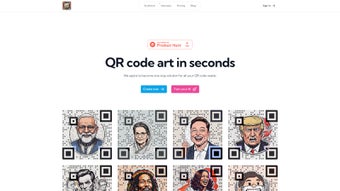

Download Zust – AI‑Powered Artistic QR Code Generator
Overview
Zust QR is a cutting‑edge web application that transforms the mundane task of QR‑code creation into a vibrant artistic experience. Powered by artificial intelligence, the platform lets users blend their own images, custom prompts, and brand elements into a single, scannable QR code that looks as good as it works. Whether you are a marketer looking to add visual flair to a campaign, a designer seeking a unique branding asset, or a developer interested in integrating QR‑code generation into an app, Zust offers a flexible, secure, and user‑friendly environment.
The final output is a high‑resolution PNG file, guaranteeing compatibility across desktop, mobile, and print media. In addition to the visual editor, Zust provides an API—currently on a wait‑list—that opens the door for developers to embed the same AI‑driven creativity into their own workflows. The tool’s emphasis on simplicity, speed, and visual impact makes it a standout option for anyone who wants QR codes that do more than just encode data; they tell a story.
Key Features
- AI‑Assisted Design Engine: Generate artistic QR codes by feeding the AI with custom prompts, style references, or brand colors.
- Image Integration: Seamlessly embed logos, photos, or illustrations directly into the QR pattern without breaking scanability.
- Real‑Time Preview: Watch the QR code evolve as you tweak parameters, ensuring the final design meets your expectations.
- One‑Click Export: Download the finished QR code as a PNG file at 300 dpi, ready for web, social media, or print use.
- Responsive Web Interface: No installation required—access Zust from any modern browser on Windows, macOS, Linux, Android, or iOS.
- Developer API (Waitlist): Programmatic access for automated QR creation, batch processing, and custom integrations.
- Secure Data Handling: All user‑uploaded images and generated codes are processed over HTTPS and automatically deleted after the session.
- Multi‑Language Support: Interface available in English, Spanish, German, and French, expanding its global reach.
Installation & Usage Instructions
Since Zust QR is a web‑based tool, there is no traditional installation process. Follow these steps to start creating artistic QR codes instantly:
Step 1 – Access the Platform
Open any modern browser (Chrome, Firefox, Safari, Edge) and navigate to zustqr.com. The site automatically detects your device and loads an optimized UI, whether you are on a desktop or a mobile phone.
Step 2 – Choose a Template or Start From Scratch
Once on the dashboard, you can select a pre‑designed template that matches your industry (e.g., event, e‑commerce, education) or click “Create New” to begin with a blank canvas. Templates already contain placeholder prompts and suggested color palettes, which you can edit freely.
Step 3 – Upload Images & Set Prompts
Drag and drop your logo or any image you wish to incorporate. Then, type a short descriptive prompt (e.g., “minimalist neon teal splash”) into the AI prompt box. The engine will blend the visual elements with the QR matrix while preserving scan reliability.
Step 4 – Adjust Technical Settings
Under “Advanced Options,” you can modify error correction level (L, M, Q, H) and pixel density. Higher error correction allows for more visual distortion while still being readable by most scanners. Use the built‑in scanner test to verify readability on the spot.
Step 5 – Export Your QR Code
When satisfied, click “Download PNG.” The file is saved directly to your device’s default download folder. For print projects, you may also request a vector SVG version via the “Contact Support” form—this service is free for verified users.
Step 6 – (Optional) API Integration
Developers can join the API waitlist by filling out the short form on the “Developers” page. Once approved, you’ll receive an API key and documentation for RESTful endpoints that accept JSON payloads containing image URLs, prompts, and data strings.
The entire workflow typically takes under five minutes for a basic design, and the intuitive interface ensures that even users with no design background can produce professional‑grade QR codes. Because everything runs in the cloud, there are no system‑resource constraints, making Zust QR an ideal solution for high‑volume marketing teams.
Compatibility & System Requirements
Zust QR is built on a responsive HTML5 framework and operates fully within the browser, which means it is compatible with virtually any operating system that supports modern web standards. The recommended browsers and platforms are:
- Windows 10/11 – Chrome, Edge, Firefox, or Safari (via Windows Subsystem for Linux)
- macOS 11 (Big Sur) or later – Safari, Chrome, Firefox
- Linux distributions with recent kernel (Ubuntu 20.04+, Fedora 33+)
- Android 8.0+ – Chrome or Firefox mobile
- iOS 13+ – Safari or Chrome (iOS)
Because all processing happens on Zust’s servers, there is no need for local GPU acceleration or additional plugins. An internet connection with at least 2 Mbps download speed is sufficient for smooth real‑time previews. For users concerned about privacy, the platform adheres to GDPR and CCPA guidelines, and all uploaded assets are encrypted in transit and deleted after a 24‑hour window unless saved to a personal account.
Pros and Cons
Pros
- AI‑driven design eliminates the need for graphic‑design expertise.
- High‑resolution PNG export suitable for both digital and print media.
- Fully web‑based—no software download or installation required.
- Secure, HTTPS‑encrypted workflow with automatic data deletion.
- Flexible error‑correction settings maintain scan reliability.
- Developer API (future‑ready) expands use cases beyond manual design.
- Responsive UI works across desktop, tablet, and smartphone devices.
Cons
- Advanced API access is currently limited to a waitlist, delaying integration for some developers.
- Complex designs with very high error correction can increase file size.
- Only PNG export is free; vector SVG files require a manual request.
- No offline mode—an internet connection is mandatory.
- Limited to eight pre‑defined languages for the UI; custom localization is not yet supported.
Frequently Asked Questions
Can I use Zust QR for commercial projects?
Yes. The PNG files generated by Zust QR are royalty‑free for both personal and commercial use, provided you comply with the platform’s terms of service.
How does the AI maintain QR‑code scannability?
The AI respects the QR‑code’s data matrix and error‑correction zones. It only modifies visual elements in areas that can tolerate distortion, ensuring that standard QR‑code readers still decode the embedded data.
Is there a limit to the amount of data I can encode?
Zust QR follows the QR‑code standard, supporting up to 4,296 alphanumeric characters or 2,953 binary bytes. Larger data sets may require a higher version QR code, which could affect the level of artistic detail.
Do I need an account to download QR codes?
No. Guests can create and download QR codes without registering. However, creating an account provides access to a project library, higher‑resolution exports, and early API invitations.
What security measures protect my uploaded images?
All uploads travel over TLS 1.3 encryption. Images are stored temporarily on secure servers and are automatically purged after 24 hours unless saved to a user account.
Conclusion & Call to Action
Zust QR redefines what a QR code can look like by marrying robust data encoding with AI‑powered visual creativity. The platform’s intuitive web interface, high‑quality PNG output, and strong security posture make it a compelling choice for marketers, designers, and developers alike. While the API is still in a wait‑list phase, the existing feature set already delivers enough value to justify immediate adoption for branding campaigns, event promotions, and any scenario where a standard black‑and‑white square feels too bland.
Ready to turn ordinary QR codes into eye‑catching works of art? Visit Zust QR now, create your first artistic code in minutes, and download the result for free. For businesses looking to scale, consider signing up for a premium account to unlock higher‑resolution exports and priority API access. Elevate your visual communication today—download Zust and start designing QR codes that not only work, but also wow.



.png)



